Mixed Media Digital Synergies
#00
DL-832-YR3
Animation
S01-02
03/11/26
Brief

The Module

Overview, Goals, Previous Work

Brief02
The Module//Overview

Over the course of the next 6 weeks you will create a body of work to further your technical skills of choice and compositing whilst also developing your skills in managing an animation project.

The body of work that you create will be entirely defined by you and the learning goals you set for yourself. So this is a very exciting opportunity for you to either test a pipeline for an idea you are considering or simply to develop the skills you want to focus on.

To best support the breadth of different projects, the class time this module will be used for 1-1 sessions, some skill focused tutorials and general assisted lab time. There will Work in Progress (WIP) submissions through the module to ensure ongoing feedback & support.

This is a technically focused module. This is not an animation or design module! Please do not spend more time than necessary doing either of these.

Brief03
The Module//Previous Work
F 10:00:00
0:00 / 0:00
Watch online
Modelling, Rigging, Animation, Render in Blender
BriefArthur Long 04
The Module//Previous Work
F 10:00:00
0:00 / 0:00
Watch online
Rigging in ToonBoom
BriefJoss Raferty 05
The Module//Previous Work
F 10:00:00
0:00 / 0:00
Watch online
Game Dev in Godot, Modelling in Blender, 2D Sprite in Clip
BriefReese Mc Sweeney 06
The Module//Previous Work
F 10:00:00
0:00 / 0:00
Watch online
Rigging & Animation in Moho, Modelling & Rendering in Blender
BriefRobyn Kelly 07
The Module//Key Goals & Rubrik
01
Technical skills of your choice
Animation, Rigging, Modelling, Compositing, 3D Animation etc.
02
Develop a pipeline
Learn how to develop, test and ultimately design a functional pipeline.
03
Managing a production
Practice scheduling tasks and managing a schedule alongside a production.
Brief08
The Module//Project Notes
Tools over Talent
You're marked on the technical skills you learn, not how good the animation looks. (No Tablet Apps Allowed)
Depth over Length
A few fully finished frames teaches you more about your pipeline then all of them half done. Underdeveloped pipelines lose marks.
Composition
Every project must include some compositing, 2D, 3D or both. This can be stylisation, texturing, colour grading etc.
Brief09

Pipeline & Production

The steps, and the flow between them

Brief10
Pipeline & Production//Diagram
Hover a step to trace it
Post Production is considered to happen anywhere betweenthe beginning of Composition and the end of Edit.Pre-ProductionLayoutsSoundProp Assets CreatedBackgrounds PaintingCharacter AnimationCompositionEditCompleted :)ReviewReview

Pipeline is the steps involved in creating a work and the flow from one step to another.

The flow here shows us which steps are dependent on assets from previous steps. In general when we go from one step to another we pass an asset from one program to another

The version cycle is when we review how everything is coming together, before taking another pass through our pipeline.

Brief11
Pipeline & Production//Pipeline --> Schedule
Reveal
02 NovWeek 709 NovWeek 816 NovWeek 923 NovWeek 1030 NovWeek 1107 DecWeek 12Week startingSemester weekProductionPost ProductionVersion CyclesSubmissionsLayoutsSoundProp Assets CreatedBackgrounds PaintingCharacter AnimationCompositionEditLayouts, V01Sound, V01Prop Assets Created, V01Backgrounds Painting, V01Character Animation, V01Composition, V01Edit, V01Review V01Layouts, V02Sound, V02Prop Assets Created, V02Backgrounds Painting, V02Character Animation, V02Composition, V02Edit, V02Review V02Layouts, V03Sound, V03Prop Assets Created, V03Backgrounds Painting, V03Character Animation, V03Composition, V03Edit, V03Finalise V03Project ProposalFri 6th NovWIP Submission #01Fri 13th NovWIP Submission #02Fri 27th NovFinal SubmissionFri 11th Dec
Brief12
Pipeline & Production//Pipeline & Schedule Notes
01
Expect it to change
Not sure of your pipeline yet? That's expected. Draft it up as best you can then update it as you learn more.
MiroGreat for moodboarding & pipeline diagrams. Free student use.
02
Map it to time
Lay your pipeline's steps out across the weeks to plan how long each one gets.
03
Track and adjust
Check progress against the schedule regularly and adjust as needed.
Production Document TemplateMake a Copy of this to use!
Brief13

Your Project

Proposals, Deliverables, Dates etc

Brief14
Your Project//Focus

Your project can focus more on a single skill like rigging, or can focus more on the synthesis of many skills into an interesting pipeline. Anywhere on this spectrum is perfectly fine :)

Brief15
You still need to composite your work in some way no matter what you do.
Your Project//Proposal

You must submit a project proposal for sign off by Fri 6th Nov. Your proposal should include:

  1. 01Brief description of your project. In this you must clearly name the learning goals you are setting yourself ie. the specific skills or pipeline you are going to develop on. Please add supporting imagery..doc, .pdf
  2. 02Initial Pipeline Diagram: An outline of your prpipeline, this can evolve over the weeks..png
  3. 03Initial Project Schedule: A screenshot of your schedule, this should evolve over the weeks.png
Key Dates
Sign off by06/11/26
Time6pm

You will submit this via the Project Proposal Folder on Teams by this Fri 6pm, Nov 6th.

Brief16
Your Project//Bi-weekly WIP Submissions

Each student will complete a bi-weekly work in progress submission. Each submission you will fill out a brief questionnaire and submit your response alongside:

  1. 01Work in Progress Material: Any relevant work that shows your progression, this can be styleframe, renders, screenshots, screen recordings. Whatever demonstrates your tests and progress (images or video).pngs, .mp4
  2. 02Current Pipeline Diagram: This should reflect your most up to date understanding of you pipeline.png
  3. 03Current Project Schedule: This should be an up to date schedule, showing where time has been spent and when future tasks are planned to be completed.png
  4. 04A response to the WIP Reflection Questionnaire..pdf
Key Dates
WIP 113/11/26
WIP 227/11/26

Not only is this is an assessable component of this module but it is also a means to offer regular feedback, so please don’t forget!

You will submit this via the WIP Submission Folder on Teams.

Brief17
Your Project//Final Submission

Your Final Submission should include:

  1. 01Body of Work: Any relevant work in progress or final material, this can be style frames, renders, screenshots, screen recordings etc. (images or video)
  2. 02Composited Video: One final compositing pass of your work.mp4
  3. 03Closing Pipeline Diagram: This should reflect your full understanding of your pipeline..png
  4. 04Closing project Schedule: This should capture how time was spent over the past 6 weeks.png
  5. 05A response to the Closing Reflection Questionnaire.
Key Dates
Final11/12/26

Give yourself at the very least a half day to gather your work at the end of this module.

You will submit this via the Final Submission Folder on Teams.

Brief18

Practicalities

Schedules, software and hardware

Brief19
Practicalities//Weekly Schedule
MonTueWedThuFri
AM10:00–13:00
Self Directed StudyD208
Self Directed DigitalD208
PM14:00–17:00
Self Directed StudyD208

1 to 1 Sessions will be booked in via the timesheet linked to the right. Try to keep to one booking a week. If you are unable to book a slot, but need assistance don't hesitate to contact us via Teams.
Contact Timesheet
Brief20
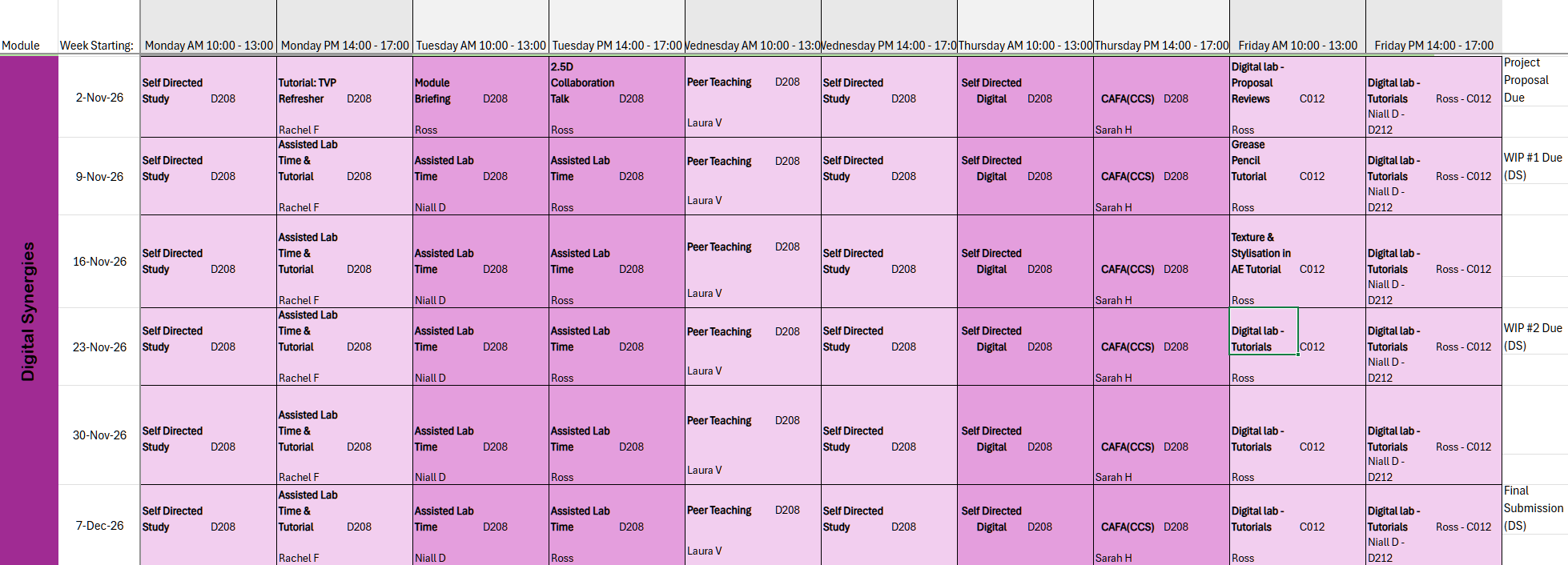
Practicalities//6 Week Schedule
The above is a current layout for specific classes and tutorials. The slots won't change but the exact tutorials will. I will review and update on Week 2 after reading the proposals.
BriefPasted Image 20261101211309 21
Practicalities//Final Notes
01
Software & Hardware
Please factor your own personal access to software and hardware into your plan.

If you need to access something, or you are experiencing tech issues, let me know ASAP so that we can work to resolve it.

02
Working in Groups
Yes you can work in groups, I hope some of you do!

Simply note clearly in your proposal that you wish to do so and we will discuss the specific requirements for this.

Brief22

Do something that interests and challenges you!

Brief23
Do something that interests and challenges you!//Resources
Miro, great for moodboarding & pipeline diagrams
Production Document Template
Submission Instructions
Contact Timesheet for 1-1 sessions
Brief24